The promise of Starlink internet isn't just about high-speed, low-latency connectivity from almost anywhere; it's also about a reliable user experience that extends to its customer support. Navigating Starlink customer support involves understanding a primarily digital ecosystem, designed to efficiently get you the help you need, whether you're tackling an initial setup challenge or optimizing your connection. This guide unpacks the nuances of Starlink's support structure, ensuring you know exactly how and where to turn when questions arise.
At a Glance: Your Starlink Support Essentials
- Digital-First Approach: Starlink primarily uses its app and website for support, offering 24/7 assistance through an AI assistant, with escalation to live agents.
- Ticket System is Key: For most issues (billing, general inquiries, account management), submitting a support ticket via the Starlink app or website is the official and most effective method.
- App is Preferred: Using the Starlink app for support tickets allows for automatic diagnostic data submission, speeding up resolution.
- Dedicated Phone Lines (U.S. & Canada Only): A trial phone service exists for specific critical issues like outages or initial setup connection problems, not for general inquiries or billing.
- Country-Specific Options: Some regions offer unique support avenues, including in-person or WhatsApp, particularly for those unable to access their accounts.
- No Retail Support: Starlink's registered offices or typical retail stores do not handle customer support, deliveries, or returns. All official support flows through Starlink.com or the app.
The Digital Backbone: How Starlink Support Generally Works
Starlink has engineered its customer support to mirror the innovative, digital-first nature of its service. Forget hunting for a general support email or a universal phone number; Starlink's system is built around a streamlined, account-centric model.
When you need help, your journey almost always begins within the Starlink app or via starlink.com. This approach isn't just about efficiency; it's about context. By starting your inquiry through your account, Starlink's system automatically has access to critical diagnostic information about your dish (Dishy), router, and service status. This means less time spent explaining your setup and more time getting to a resolution.
Starlink's customer support teams operate 24/7 across multiple languages, ensuring help is available no matter your time zone or location. Your initial contact will typically be with an AI assistant. This intelligent bot is often capable of resolving common issues or guiding you to relevant help articles without needing human intervention. However, if your issue requires more nuanced assistance, the system provides a clear path to escalate your chat to a live agent. When a live agent responds, they do so via messages within the support ticket interface, or by calling the phone number associated with your Starlink account, if the issue warrants a direct conversation.
It's crucial to understand that Starlink's registered offices are not equipped to handle customer support inquiries. This includes questions about deliveries, returns, or technical issues. All official support channels direct you back to the Starlink app or website. Similarly, while Starlink uses local logistics partners like DHL Express or the Post Office for shipping, any delivery-related issues, returns, or order changes must be initiated through Starlink's official support channels, not directly with the courier. This centralized approach ensures consistency and proper tracking of all customer interactions.
Crafting a Support Ticket: Your Primary Gateway to Help
For the vast majority of support needs—from billing inquiries and account changes to technical troubleshooting and general questions—submitting a support ticket is your go-to method. It’s a straightforward process, designed to capture all necessary details and route your query to the correct team.
Preferred Method: Through the Starlink App (for Optimal Diagnostics)
Using the Starlink app is often the most efficient way to submit a support ticket. The key advantage here is that the app can automatically gather diagnostic data from your Starlink hardware, which significantly helps the support team understand and troubleshoot your issue faster.
- Sign In: Open the Starlink app on your mobile device and sign in with your account credentials.
- Navigate to Support: Tap the "Support" icon, usually found in the bottom navigation bar.
- Access Messages: Select "Messages." This section houses your ongoing and past support conversations.
- Initiate Contact: Look for an option like "Contact Starlink Support" or a similar prompt to start a new ticket.
- Describe Your Issue: Clearly and concisely explain your problem. Be specific, providing details such as when the issue started, any error messages you’re seeing, and troubleshooting steps you’ve already taken.
Alternative Method: Via Starlink.com (Web Browser)
If you prefer using a computer or can't access your app, the Starlink website provides an identical process for ticket submission.
- Sign In: Open your web browser, go to starlink.com, and sign in to your Starlink account.
- Access Help Center: Navigate to the "Help Center" tab, typically found in the main menu or footer.
- Contact Support: Within the Help Center, you'll find a link or button labeled "Contact Support." Click this to initiate a new support ticket.
- Detail Your Problem: Just like with the app, provide a thorough description of your issue, including any relevant dates, observations, and prior troubleshooting.
Guest Support: When You Can't Access Your Account
What if you're locked out of your account, haven't received your equipment, or have a pre-order question without an active account? Starlink offers a guest support option for these scenarios. This ensures that even those without full account access can still reach out for help.
- Guest Support Link: Visit the Starlink website and look for a "Guest Support" link, often found in the Help Center or contact sections. This link allows you to submit a ticket without signing in. Be prepared to provide details like your order number or the email address associated with your order.
Pro-Tip for Tickets: Always be as detailed as possible in your initial message. The more information you provide upfront, the less back-and-forth will be needed, leading to a quicker resolution. Screenshots or photos of error messages can also be incredibly helpful.
Dedicated Phone Lines: A U.S. and Canada Trial for Critical Issues
While digital communication remains Starlink's primary support channel, U.S. and Canadian customers have access to a dedicated phone line for specific, time-sensitive issues. This service is currently in a trial phase and is highly specialized, underscoring Starlink's targeted approach to support.
These phone lines are strictly for solving outages and connection issues. They are not for billing questions, order status updates, or general inquiries. For anything outside of critical service interruption, you'll still need to use the digital ticket system.
Who Can Call & For What?
- U.S. Starlink Support Number: 1-866-606-5103
- Canada Starlink Support Number: 1-888-864-1321
- Operating Hours: Monday through Friday, 6:00 AM to 6:00 PM Central Time.
- Languages: English and Spanish.
- Specific Triggers: These numbers are only displayed under particular Help Center articles: "I fell offline, but was online before" and "I cannot get online during initial setup." If your issue doesn't fit these descriptions, the phone line is not for you.
Calling Requirements
When you call, you'll need to verify your account to proceed. This ensures that the support agent has immediate access to your specific service details and can focus on your issue.
- Account Phone Number: Input the phone number tied to your Starlink account.
- Account Number: You'll also need your Starlink account number.
- On the Web: Find it under your name at the top right corner of your main account page on starlink.com.
- In the App: Locate it under "Account Info" in the mobile app.
Important Caveat: Calling these numbers for issues outside of outages or initial setup connection problems will likely result in being directed back to the online ticket system. Respecting these limitations helps ensure the phone lines remain clear for customers experiencing critical service interruptions.
Beyond the Digital: Country-Specific Support Options
While the global standard for Starlink support is digital, some regions have additional, localized options to cater to specific needs or technological landscapes. These variations often address situations where digital access might be challenging or where in-person interaction is culturally preferred.
Regions with Guest/No Account Contact
In several countries, Starlink provides contact options even if you don't have an account or are locked out. This is particularly useful for pre-order inquiries, delivery issues before account activation, or problems accessing your digital account.
- Armenia, Israel, Kenya, Liberia, Oman, Qatar, Nigeria: For customers in these nations, specific links or methods are available on starlink.com to contact support without needing to log in. This typically involves submitting a guest support ticket as described above, ensuring no one is left without a channel to communicate.
In-Person Support (Ghana)
Ghana stands out with a unique offering: in-person support available at designated retail locations. This provides a valuable alternative for customers who prefer face-to-face assistance or require hands-on troubleshooting that's difficult to manage remotely. If you're in Ghana and facing an issue, checking the Starlink Ghana website for authorized retail locations and their support services is a wise first step.
Localized Digital & Phone Support (Indonesia)
Indonesia offers a more integrated, localized support experience for its active customers:
- By Phone: Active customers with a Starlink account registered to an Indonesia address can call for support.
- Operating Hours: Monday-Friday, 9 AM - 6 PM Western Indonesia Time (WIB).
- By WhatsApp: Recognizing the prevalence of messaging apps, Starlink Indonesia also offers support via WhatsApp for active customers with accounts registered to an Indonesia address.
- Operating Hours: Monday-Friday, 9 AM - 6 PM WIB.
These country-specific options highlight Starlink's efforts to adapt its global support model to local contexts, providing more accessible avenues for users in certain regions. Always check your local Starlink country page for the most up-to-date and specific support information.
Maximizing Your Starlink Support Experience
Getting the most out of Starlink's customer support isn't just about knowing where to go; it's about how you engage with the system. Here are some best practices to ensure a smooth and effective support experience:
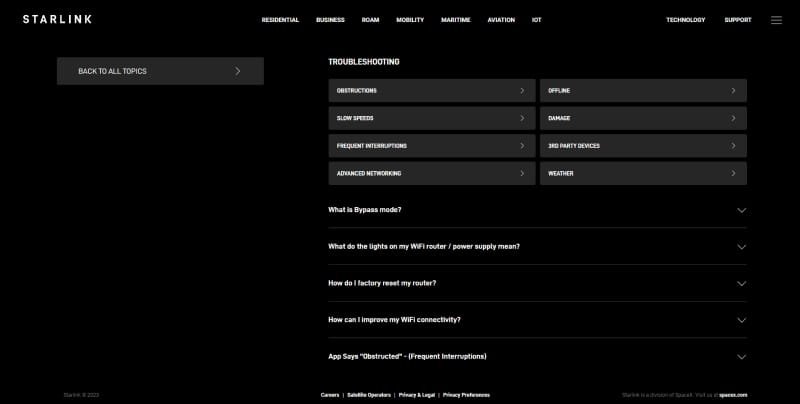
- Start with the Help Center: Before submitting a ticket, browse Starlink's comprehensive Help Center. Many common issues have detailed guides and FAQs that can provide an immediate solution, saving you time.
- Be Specific and Clear: When describing your issue in a support ticket, be as descriptive as possible. Instead of "Internet is slow," try "My internet speed has dropped significantly since yesterday at 3 PM, affecting streaming and video calls. I've tried rebooting Dishy and the router, but the problem persists."
- Include Evidence: Screenshots of error messages, speed test results, or photos of your equipment (e.g., if there's damage or an unusual light pattern) can be invaluable. Attach them directly to your support ticket.
- Be Patient with Digital Responses: Remember that responses from live agents come via messages within the app or website ticket system. Check back periodically for updates. If a call is warranted, they will use the number on your account.
- Understand Scope: Be aware of the limitations of certain support channels. Don't use the U.S./Canada phone line for billing questions, as it will only delay your resolution.
- Keep Your Account Info Handy: If you're calling the dedicated phone lines, have your account number and the phone number linked to your account ready for quick verification.
- Update Your Contact Information: Ensure the phone number and email address associated with your Starlink account are current. This is how support agents will reach you if a phone call is necessary.
Common Misconceptions About Starlink Support
Let's debunk a few common myths to set clear expectations:
- "There's a general Starlink phone number for everything." False. Starlink operates on a digital-first model, with phone support limited to specific, critical issues for U.S. and Canadian customers only, and some specific local options in countries like Indonesia.
- "I can go to a Starlink office for help." False. Starlink's registered offices do not handle customer support inquiries. Support is exclusively through the app, website, or specific localized channels.
- "I should contact DHL/Post Office directly for delivery issues." False. While local logistics partners handle the final leg of delivery, any issues with your Starlink order (missing package, damaged box, return initiation) must be channeled through Starlink's official support system first. They will then coordinate with their partners.
- "AI support is useless." Not true. Starlink's AI assistant is designed to handle common queries and guide you to resources. Often, it can resolve your issue without needing a live agent, speeding up your path to a solution.
Beyond Troubleshooting: The Ongoing User Experience
Starlink's commitment to user experience extends beyond just fixing problems. It encompasses regular software updates that enhance performance, introduce new features, and proactively address potential issues. Monitoring your Starlink app for performance metrics, checking for obstruction warnings, and understanding firmware updates are all part of a proactive approach to managing your service. Engaging with the support system effectively when needed is the final piece of this puzzle, ensuring your satellite internet experience remains as seamless as possible.
By understanding Starlink's digital-first support architecture, knowing when and how to use the various contact methods, and preparing your inquiries effectively, you're empowered to navigate any challenge with confidence. The goal is always to get you back online and enjoying your high-speed connection, efficiently and reliably.