Starlink has revolutionized internet access for millions, promising high-speed connectivity even in the most remote corners of the globe. But for anyone considering making the switch, a true Starlink Cost Analysis & Pricing Breakdown reveals that the financial commitment extends far beyond a simple monthly fee. Understanding the full price tag — from initial hardware to ongoing operational costs — is crucial for making an informed decision.
It’s not just about the advertised monthly plan. You're looking at a multi-faceted investment that includes equipment, setup, potential accessories, taxes, shipping, and even the electricity to power your dish. Let's peel back the layers and uncover what you can realistically expect to pay for Starlink in 2025.
At a Glance: What Starlink Really Costs
- Initial Hardware Kit: Typically starts at $349, but specialized kits can go up to $2,500. Watch for promotions!
- Installation: DIY is free. Professional installation can range from $100 to over $1,350 depending on complexity.
- Monthly Service: Ranges from $80 for Residential Lite to $250+ for Business plans, with Roam at $165.
- Hidden Fees: Budget for hardware shipping ($25-$75), monthly taxes/regulatory fees ($7-$17 total), and increased electricity bills ($8-$15/month).
- Optional Accessories: Mounts, longer cables, Ethernet adapters, and travel cases often add $30-$150.
- Ways to Save: Choose the right plan, look for promotions, and consider DIY installation.
The Gateway Cost: Starlink Hardware and Initial Setup
Before you can stream, browse, or work from anywhere, you need the physical hardware to connect to the Starlink satellite constellation. This initial investment is often the largest single expense and comes with several considerations.
Choosing Your Dish: The Hardware Kit Breakdown
Starlink offers a few different hardware kits, each designed for specific user needs and performance expectations. The choice significantly impacts your upfront cost.
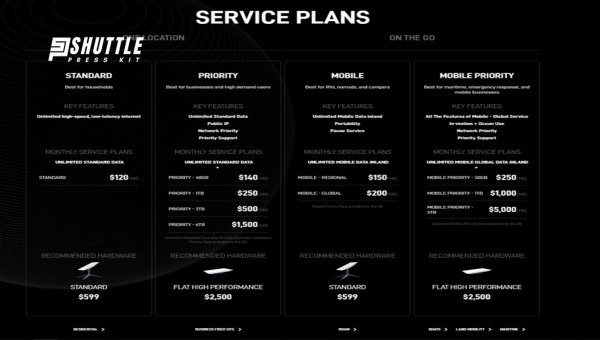
- The Standard Hardware Kit (Residential, Roam): This is the most common kit, designed for fixed residential use or mobile use with the Roam plan. It typically costs $349 USD. This kit includes:
- The Starlink Dish (often called "Dishy" by users)
- A Wi-Fi router
- A basic mounting base
- Cables (power and data)
- A power supply
This kit is generally robust enough for most users and offers reliable performance under typical conditions. Keep an eye out for occasional promotions that can reduce this price, sometimes even offering the kit for free with a long-term service commitment. - The Starlink Mini Kit: Introduced for travelers and those needing ultimate portability, the Mini kit is more compact and designed for easier transport. This newer option comes with a higher price tag, typically around $599 USD. It's ideal for adventurers, RVers, or digital nomads who prioritize a smaller footprint and lighter weight for their mobile internet setup.
- The Performance/High Performance (HP) Kit (Business, Maritime): For users with more demanding needs—such as businesses requiring higher throughput, extreme weather resilience, or consistent connectivity in challenging environments like maritime applications—the HP kit is the premium choice. This kit can cost up to $2,500 USD. It features a larger dish, enhanced components, and superior performance, justifying its significantly higher price point.
Getting Connected: Installation Costs
Once you have your hardware, the next step is installation. Starlink provides options that cater to different comfort levels and budgets.
- DIY Installation (Free): Most Starlink users opt for a do-it-yourself setup, which is free. The standard Starlink kit is designed for relatively easy installation. You typically place the dish on a roof, pole, or even the ground (with a clear view of the sky), connect a few cables, and power it on. The Starlink app guides you through the process, helping you find the optimal unobstructed view. This is the most cost-effective approach and surprisingly straightforward for many.
- Professional Installation ($100 - $1,350+): If you're uncomfortable with heights, lack the tools, or face a complex installation scenario (e.g., routing cables through walls, mounting on a very steep roof, or needing specialized pole mounts), professional help is available. The cost for professional installation can vary widely:
- A basic, straightforward professional mount on an accessible roof might cost $100-$300.
- More complex installations involving custom fabrication, extensive cable routing, or challenging access could easily push costs to $500-$1,000.
- For very specialized or remote installations, especially for business clients or those requiring heavy-duty equipment, prices could exceed $1,350.
Always get a quote from a local installer (electricians, satellite dish installers, or general contractors often offer this service) before committing.
Essential Add-ons: Accessories You Might Need
The basic Starlink kit is functional, but many users find they need additional accessories to optimize their setup. These aren't included in the initial hardware cost but are often necessary practical considerations.
- Mounting Hardware ($30-$150): The basic kit includes a small kickstand mount, which is fine for ground placement but often insufficient for permanent roof or pole installations. Starlink offers a range of specific mounts:
- Pole Mount: For attaching to an existing pole.
- Pivoting Pole Mount: For more adjustable angles.
- Long Wall Mount: To extend the dish away from a wall.
- Roof Ridge Mount: For securing to the peak of a roof.
These specialized mounts can cost anywhere from $30 to $150, depending on the type and material. Local hardware stores might also offer compatible universal mounting solutions for less, but always verify compatibility. - Longer Cables: The standard cable length provided with the kit is generally sufficient, but if your setup requires placing the dish far from the router, you might need a longer cable. These can be purchased directly from Starlink.
- Ethernet Adapter/Mesh Nodes: The included Starlink router provides Wi-Fi, but it lacks Ethernet ports. If you need to hardwire devices (like a desktop computer, gaming console, or a separate Wi-Fi mesh system), an official Starlink Ethernet Adapter is required, usually costing around $40-$50. For larger homes or properties, additional Starlink Mesh Nodes (around $100-$150 each) can extend your Wi-Fi coverage significantly.
- Travel Cases (for Roam users): If you plan to frequently move your Roam service, a rugged travel case to protect the dish and components is a wise investment, often costing $100-$200.
Shipping and Taxes on Hardware
Don't forget to factor in the delivery. A one-time hardware shipping fee typically ranges from $25 to $75 USD, depending on your location and the specific kit. Additionally, sales tax will apply to all hardware and accessory purchases, usually adding 5-10% to the total cost based on your state or regional tax rates.
Decoding Starlink's Monthly Service Plans
Once your hardware is installed, the recurring monthly service fee becomes your primary ongoing expense. Starlink offers several plans tailored to different user scenarios, each with its own pricing and features. It's vital to choose the right one to avoid overpaying or experiencing service limitations.
Residential (Standard): The Home User's Choice
- Cost: $120 USD per month
- Features: This is the flagship plan for fixed home addresses. It offers standard data priority, meaning your connection is optimized for consistent performance at a single location. You get unlimited data, which is a significant advantage over many traditional satellite internet providers.
- Ideal for: Families, remote workers, or anyone needing reliable, high-speed internet at their home without worrying about data caps.
Residential Lite: Budget-Friendly for Congested Areas
- Cost: $80 USD per month
- Features: Introduced for areas with higher network congestion, Residential Lite offers a lower data priority than the standard Residential plan. This means during peak usage times, your speeds might be slightly reduced compared to standard users. However, it still offers unlimited data and is a more affordable entry point.
- Ideal for: Users in congested areas who are more budget-conscious and can tolerate slightly lower performance during peak hours, or those with lighter internet usage.
Roam (formerly RV): Internet On the Go
- Cost: $165 USD per month
- Features: Designed for mobile use, such as RVs, campers, and travel trailers. Roam provides standard data priority and allows you to use your Starlink service at different locations. A key feature of Roam is the ability to pause service when not in use, making it incredibly flexible for seasonal travelers.
- Ideal for: Digital nomads, RV enthusiasts, or anyone who needs internet connectivity while traveling extensively within their continent.
Business: High Performance for Demanding Use
- Cost: $250+ USD per month
- Features: Starlink Business plans are designed for enterprises, offices, and high-demand users. These plans come with higher data priority, ensuring more consistent and faster speeds, even during peak network times. However, unlike Residential plans, Business plans include hard data caps ranging from 50GB to 2TB per month.
- Overage Charges: Exceeding your priority data cap incurs additional charges. These can range from $25 to $125 for local tiers and $100 to $500 for global tiers, depending on the volume of additional priority data purchased.
- Ideal for: Small businesses, remote offices, critical infrastructure, or users with extremely high bandwidth requirements where guaranteed performance is paramount.
The Impact of Regional Pricing and Promotions
It's crucial to understand that the prices listed above are typical for the US market in 2025 but are subject to regional variations. Depending on your specific address or country, monthly service fees can fluctuate by $20 to $40 USD either higher or lower. These differences often reflect local market conditions, regulatory costs, or network capacity in a particular area.
Always, always check the Starlink website (starlink.com) for the most current pricing, tax estimates, and shipping fees specific to your address. Starlink's pricing is dynamic, and promotions for both hardware and service are common, especially in new or expanding service areas.
The "Hidden" Costs That Can Add Up
Beyond the obvious hardware and monthly service fees, several less apparent expenses can impact your overall Starlink cost analysis. Ignoring these can lead to an unwelcome surprise on your bill.
Taxes and Regulatory Fees
Just like any utility or telecommunications service, Starlink is subject to various taxes and regulatory fees that vary by location.
- Sales Tax: Expect to pay sales tax on your monthly service bill. This can range from 5% to 10% of your total bill, depending on your state, county, or municipality.
- Regulatory Fees: Many jurisdictions impose universal service fund fees, 911 fees, or other regulatory charges. These typically add an extra $2 to $7 per month to your bill.
While these amounts might seem small individually, they quickly accumulate, adding anywhere from $7 to $17 or more to your monthly commitment.
Hardware Shipping: A One-Time Fee
We touched on this earlier, but it bears repeating. Even if you snag a hardware promotion, you'll almost certainly pay a one-time shipping fee for your Starlink kit. This typically falls between $25 and $75 USD. It's a non-negotiable part of getting your equipment delivered to your doorstep.
Power Consumption: The Electricity Bill Impact
Your Starlink dish isn't just a passive receiver; it's an active piece of technology constantly communicating with satellites and maintaining optimal signal strength. This requires power.
- Typical Usage: The Starlink dish consumes approximately 50-75 watts per hour. This usage can fluctuate based on environmental factors (e.g., more power to melt snow in colder climates) and network activity.
- Monthly Impact: Depending on your local electricity rates (which vary significantly by region, from $0.10 to $0.30+ per kWh), this translates to an additional $8 to $15 per month on your electricity bill. While it might seem minor, it's an ongoing operational cost that traditional internet services might not impose directly on your utility bill in the same way.
Additional Network Equipment: Beyond the Basic Kit
As mentioned in the hardware section, the basic Starlink kit is lean. If your needs extend beyond a simple Wi-Fi connection in one room, you might need to invest in additional network gear.
- Specialized Mounts ($30-$150): For optimal signal and long-term stability, many users purchase Starlink's dedicated mounts (pole, roof, wall mounts) or third-party solutions.
- Ethernet Adapters ($40-$50): If you have devices that need a wired connection or want to integrate Starlink into an existing home network, the official Ethernet adapter is often necessary.
- Mesh Nodes ($100-$150 each): For larger homes or properties, extending Wi-Fi coverage with Starlink Mesh Nodes is a common upgrade.
These aren't mandatory but are frequently desired for a complete and robust setup, adding to the total Starlink cost.
Smart Strategies to Lower Your Starlink Bill
While Starlink offers unparalleled connectivity in many areas, there are definite ways to manage and even reduce your overall expenditure. A little planning can go a long way.
1. Choose the Right Service Plan for Your Needs
This is perhaps the most significant opportunity for savings. Don't simply default to the standard plan.
- Consider Residential Lite ($80/month): If you're in a moderately congested area or your internet usage isn't critically time-sensitive (e.g., less real-time gaming, fewer critical video conferences), Residential Lite offers the same unlimited data at a $40 per month savings over the standard Residential plan. Over a year, that's $480 back in your pocket.
- Utilize Roam's Pause Feature ($165/month): For RVers and travelers, the ability to pause your Roam service is a game-changer. If you only travel for certain months of the year, you can pause your service when stationary and resume it only when you need it. This avoids paying the full monthly fee during periods of non-use, potentially saving hundreds of dollars annually.
- Align Business Data Tiers: Business users need to meticulously assess their actual data consumption. Over-provisioning for a 2TB plan when you only use 500GB means you're paying for unused priority data. Conversely, under-provisioning can lead to costly overage charges. Select a tier that closely matches your average usage.
2. Hunt for Promotions and Discounts
Starlink occasionally offers compelling promotions, especially for hardware. These are often regional or time-limited, so staying vigilant can pay off.
- Hardware Discounts: Look for periods when Starlink offers its standard hardware kit at a reduced price (e.g., $199 instead of $349) or even for free. These often coincide with network expansion or off-peak seasons. Some regions have offered free hardware with a 12-month service agreement.
- Introductory Service Rates: Less common but still possible, Starlink may offer a reduced monthly service fee for the first few months in new service areas.
- How to Find Them: Regularly check the Starlink website (starlink.com) for your address, sign up for their email newsletters, and monitor reputable Starlink user communities for announcements.
3. Embrace DIY Installation
As discussed, professional installation can be a significant upfront cost. Unless you have specific physical limitations or highly complex mounting needs, the Starlink system is designed for user-friendly DIY setup. By handling the installation yourself, you immediately save anywhere from $100 to over $1,350. The Starlink app provides clear instructions and an obstruction checker to guide you.
4. Monitor Data Usage (for Capped Plans)
For Roam users (which may have soft caps in certain regions or during high congestion) and especially Business users, proactive data monitoring is essential. Starlink's app and account dashboard provide tools to track your data consumption. Regularly checking this allows Business users to adjust their plan if consistently under- or over-utilizing their allocated data, or to make informed decisions about purchasing additional priority data rather than being surprised by a hefty bill.
Starlink vs. The Alternatives: A Value Proposition
Understanding Starlink's cost is only truly meaningful when compared to other internet options available to you. For many in rural and remote areas, Starlink isn't just an option; it's often the best option. Let's look at how it stacks up against typical offerings as of October 2025 pricing.
| Internet Provider | Typical Monthly Cost | Download Speeds (Mbps) | Data Caps / Limitations | Ideal Use Case |
|---|---|---|---|---|
| Starlink | $120 | 50-200 | Unlimited (Residential) | Remote/Rural, High-Speed Needs |
| Viasat | $99-$130 | Up to 150 | 850GB soft cap | Remote/Rural, Moderate Use |
| Hughesnet | $99 | Up to 50 | 100-200GB soft cap | Remote/Rural, Light Use |
| Urban Cable | $70-$100 | 200+ | Usually Unlimited | Urban/Suburban, General Use |
| Urban Fiber | $80-$120 | 300+ | Unlimited | Urban/Suburban, High-Bandwidth |
When Starlink Shines Brightest
Looking at the comparison, Starlink's value proposition becomes crystal clear in specific scenarios:
- Rural and Remote Areas: This is Starlink's primary target market. If you live in an area where cable or fiber internet simply doesn't exist, or where DSL speeds are painfully slow (e.g., 5-10 Mbps), Starlink offers a transformative leap in connectivity. It brings urban-level speeds and reliability to places that have historically been underserved.
- Need for High-Speed and Unlimited Data: Compared to traditional satellite providers like Viasat and Hughesnet, Starlink typically offers significantly higher download speeds (often 50-200 Mbps vs. 50-150 Mbps) and, crucially for its Residential plans, truly unlimited data. The soft caps or hard caps of competitors can severely limit usage for streaming, online gaming, and large downloads, leading to frustrating slowdowns or expensive overage charges.
- Reliability in Challenging Environments: For those who prioritize a robust connection in adverse weather (though heavy rain/snow can impact performance), or need internet for critical remote work or education, Starlink often outperforms older satellite technologies in terms of latency and consistency.
While Starlink's monthly fee of $120 might be higher than some basic urban cable plans, its immense value lies in solving the internet access problem for millions who previously had no viable high-speed option. It's not just an internet service; it's an enabler for modern life in areas that were once cut off. If you're comparing Starlink to urban fiber, it might seem expensive for slightly lower speeds, but that's not its intended competition. Its true comparison is to the limited, slow, and expensive alternatives that rural residents have endured for years.
Navigating Price Changes and Data Caps in 2025 and Beyond
Starlink's journey has been marked by rapid expansion and technological evolution, which often means its pricing and policies are not static. Staying informed is key to managing your costs effectively.
Price Fluctuations are a Reality
In 2025, Starlink users have already seen adjustments to service plan fees, reflecting the company's ongoing operational costs, network enhancements, and market dynamics.
- Recent Increases: The standard Residential plan saw an increase from $110 to $120 per month. Residential Lite moved from $70 to $80, and the popular Roam plan adjusted from $150 to $165 per month.
- Promotional vs. Standard Rates: While promotions for hardware and introductory service rates are common, remember these are typically temporary. After the promotional period, your bill will revert to the standard rate. Always clarify the duration and terms of any discount.
These fluctuations underscore the importance of treating the listed prices as current estimates rather than fixed rates for the indefinite future.
Understanding Data Caps and Overage Charges
One of Starlink's most appealing features for many has been its "unlimited data." However, it's crucial to understand how this applies across different plans, particularly in 2025.
- Residential (Standard & Lite): These plans largely maintain their promise of unlimited data. Users on these plans can typically stream, download, and browse without worrying about hitting a cap or incurring overage fees for typical usage.
- Roam: While Roam offers mobile flexibility, specific regions or periods of extreme network congestion could lead to temporary prioritization of fixed Residential users. While not a hard cap, Roam users might experience reduced speeds during peak times or in saturated cells.
- Business/Priority Tiers: This is where hard data limits come into play. Business plans are designed with monthly priority data limits (e.g., 50GB, 500GB, 1TB, 2TB). Exceeding these limits can result in two main outcomes:
- Speed Reduction: Your service may be deprioritized, leading to significantly reduced speeds until the next billing cycle.
- Additional Charges: More commonly for Business users, exceeding your priority data tier will incur additional charges. These can range from $2 to $10 per extra GB for standard business use, or even higher for specific enterprise-level contracts or international roaming.
International Roaming Surcharges and New Regulatory Fees
As Starlink expands its global footprint, users traveling internationally with Roam might encounter new surcharges. Regulatory frameworks and taxation vary widely by country, and Starlink may pass on these additional costs to users crossing international borders with their service. Keep an eye on Starlink's service terms for international travel.
How to Stay Informed About Pricing Changes
To avoid surprises on your Starlink bill, proactive monitoring is your best defense:
- Check starlink.com Regularly: This is the official source for the most up-to-date pricing specific to your service address.
- Sign Up for Email Alerts: Ensure your contact information is current in your Starlink account settings to receive official communications about price adjustments or policy changes.
- Monitor Your Account Dashboard: Your personal Starlink account dashboard provides real-time information about your current plan, billing cycles, and data usage (for applicable plans).
- Consult Community Forums: While not official, active Starlink user communities on platforms like Reddit or dedicated forums can be excellent places to hear about promotions, regional pricing nuances, or upcoming changes from fellow users.
Being aware of these dynamics ensures you're never caught off guard and can continue to enjoy Starlink's benefits with a clear understanding of your financial commitment.
Making Your Starlink Decision: The Total Cost Picture
Starlink offers an undeniably powerful solution for high-speed internet, especially for those in underserved rural and remote areas. However, as our Starlink Cost Analysis & Pricing Breakdown shows, the "real price tag" is a multifaceted figure that extends beyond the headline monthly service fee.
You'll need to budget for:
- Initial Hardware: The $349 Standard Kit is common, but be aware of the $599 Mini or $2,500 Performance Kit if your needs are specialized.
- Installation: Either free DIY or potentially hundreds of dollars for professional help.
- Necessary Accessories: Don't forget mounts, adapters, and perhaps a travel case.
- Hardware Shipping: A one-time fee of $25-$75.
- Monthly Service: From $80 (Residential Lite) to $250+ (Business), plus $165 for mobile Roam.
- Ongoing Hidden Costs: Monthly taxes and regulatory fees ($7-$17), and the electricity to power your dish ($8-$15/month).
When you add it all up, the first year of Starlink service could easily range from $1,500 to $2,500+ for a standard residential user, including hardware, installation, and twelve months of service. Subsequent years would primarily involve the monthly service fee and ongoing operational costs.
The decision to invest in Starlink boils down to your specific circumstances. If you're stuck with slow, unreliable internet alternatives, or if high-speed, unlimited data is critical for your home or business in a remote location, Starlink often represents excellent value. It's an investment in connectivity that can unlock opportunities for work, education, and entertainment previously unavailable.
Before you click "Order," take a moment to tally up all these potential costs based on your specific address and needs. Visit starlink.com, input your service address, and review the current hardware prices, service plans, and estimated taxes and shipping fees. This due diligence will empower you to make an informed choice and ensure Starlink truly fits your budget and connectivity requirements.